 Download App
 Track Order
 Help Center

Do Not Get Scammed! 7 Things to Test Before Buying a Refurbished Mobile
Your phone is about to arrive. The courier hands you the box. Your hands are a little excited, a little nervous.
You open it. The screen turns on. It looks fine.
But does it work fine?
Get Super Grade iPhone – 70% OFF Price
This is the exact moment where thousands of Indian buyers get scammed every year. Not because refurbished phones are bad — but because nobody taught them how to check a refurbished phone before buying it, or right after it lands on their doorstep.
Here’s the good news: you don’t need to be a technician. You don’t need special tools. You just need 15 minutes and this checklist.
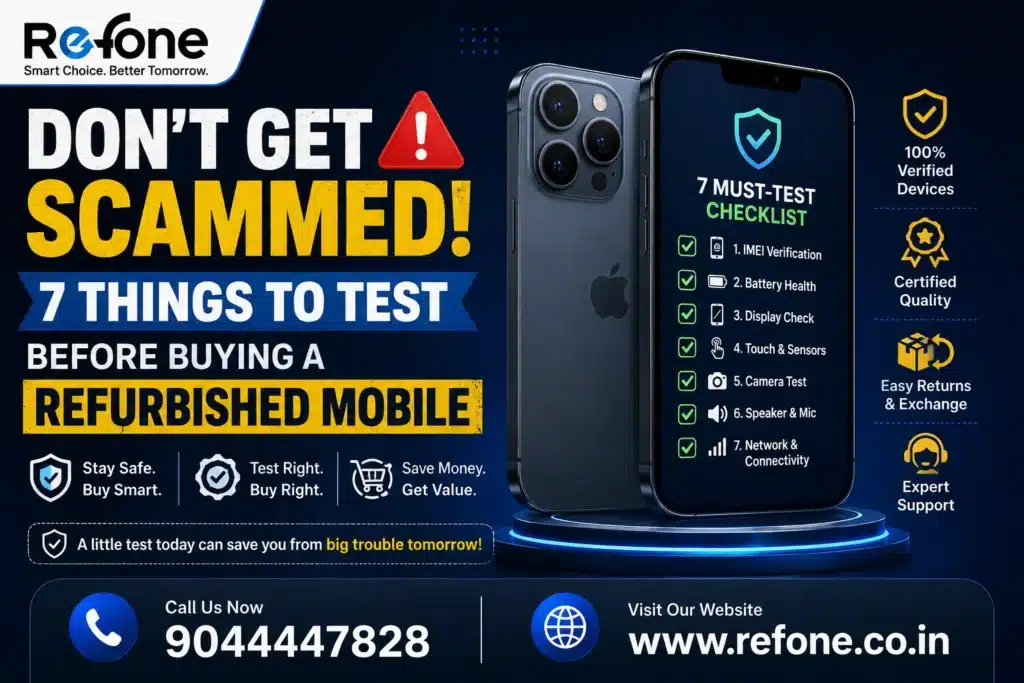
By the end of this guide, you’ll know exactly how to test a refurbished phone — from the IMEI number to the camera, battery, charging port, and hidden software locks — so you never overpay for a device that’s secretly damaged, repaired, or stolen.
Let’s make sure your next phone is a smart buy, not a costly mistake.
Why This Refurbished Phone Buying Checklist Matters
Refurbished phones are booming in India. Millions of buyers now choose a pre-owned or refurbished smartphone instead of a brand-new one, mainly to save money without giving up on flagship features like a great camera or a big display.
But that popularity has a dark side.
Not every seller runs a proper multi-point inspection. Not every “like new” phone has actually been tested. Some sellers repackage phones with swapped batteries, cracked-then-glued screens, or blacklisted IMEI numbers — and sell them at full price to buyers who don’t know what to check.
That’s exactly why this refurbished phone buying checklist exists. Think of it as your shield against second hand mobile inspection mistakes. Whether you’re buying online, from a local shop, or from a marketplace, these 7 things to check before buying a refurbished phone will protect your money and your peace of mind.
Also Read – Refurbished iPhone Hidden Problems Buyers Ignore (2026)
What Are the 7 Things to Check Before Buying a Refurbished Phone?
If you only remember one section from this article, remember this one. Here is the fast answer:
- IMEI and serial number — confirm the phone is genuine and not stolen
- Display and touchscreen — check for dead pixels, screen burn, and touch response
- Battery health — verify battery percentage and cycle count
- Cameras and sensors — test photo, video, Face ID/Touch ID, and proximity sensor
- Charging port — check charging speed and cable/port fit
- Network and connectivity — test SIM, 5G, Wi-Fi, Bluetooth, and GPS
- Software, locks, and previous repairs — check iCloud lock, FRP lock, and signs of repair
Now let’s go deep into each one, so you know exactly how to test a refurbished phone step by step.
1. IMEI and Serial Number Verification: Confirm Authenticity First
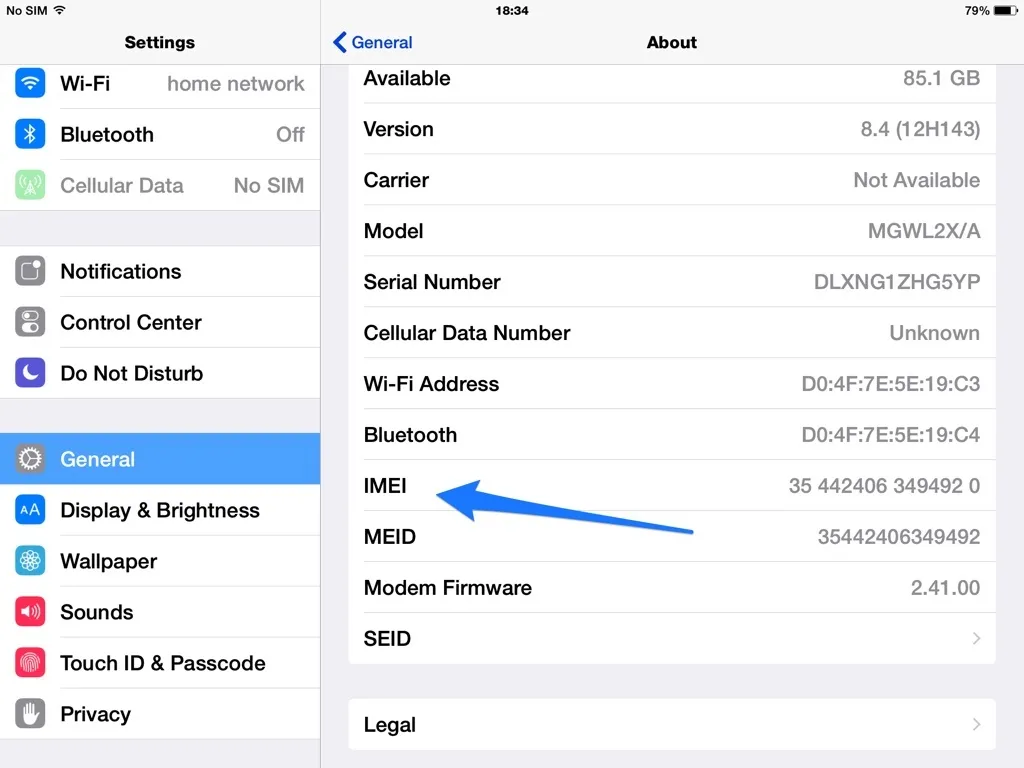
Before you even touch the screen, check the IMEI. This is the single most important step in any refurbished smartphone verification process, because it tells you whether the device is genuine, unlocked, and legally clean.
How to check IMEI before buying a phone:
- Dial *#06# on the phone to display its IMEI number
- Compare it with the IMEI printed on the box and on the SIM tray
- Visit imei.info or India’s official device verification portal to check IMEI number verification and blacklist status
- Confirm the IMEI matches the device — a mismatch is a major red flag
Why this step protects you:
A stolen phone IMEI check can save you from buying a device that gets blocked by your telecom operator later. Under India’s Central Equipment Identity Register (CEIR) system, telecom operators can blacklist and block stolen or lost phones — and if your “refurbished” phone turns out to be one of them, you could lose network access entirely, with no refund in sight.
Also check activation lock status and ownership verification. On iPhones, go to Settings > General > About and confirm there’s no previous owner’s Apple ID attached. A locked device is often unusable even if it looks perfect.
Quick tip: If a seller refuses to share the IMEI before you pay, walk away. This is one of the clearest used phone red flags.
Also Read – How to Check iPhone IMEI Number — 5 Easy Ways (2026)
2. Test the Display and Touchscreen Thoroughly
The screen is the most-touched part of any phone, and refurbished units are especially prone to touchscreen and panel issues after a repair.
How to check the display for dead pixels and touch response:
- Open a plain white, then black, then red image full-screen to spot dead pixels or discoloration
- Slowly drag your finger corner to corner to test touchscreen response across the entire panel
- Check brightness — dim or uneven brightness can mean a replaced (non-original) display
- Look for screen burn-in, especially on OLED/AMOLED phones
- Inspect from an angle under bright light for scratches, ghost touches, or a slightly raised screen (a sign of a previous repair)
Real-world insight: A common trick in low-quality refurbishment is fitting a cheaper aftermarket display. It may look fine at first glance, but colors often appear slightly washed out, and touch sensitivity near the edges can lag. If you’re testing an iPhone, check Settings > Display & Brightness — an aftermarket screen sometimes triggers a “genuine display” warning on newer iOS versions.
3. Check Phone Battery Health Before You Commit
Battery health is one of the top reasons buyers regret a refurbished phone purchase. A phone can look brand new and still have a battery that dies by 2 PM.
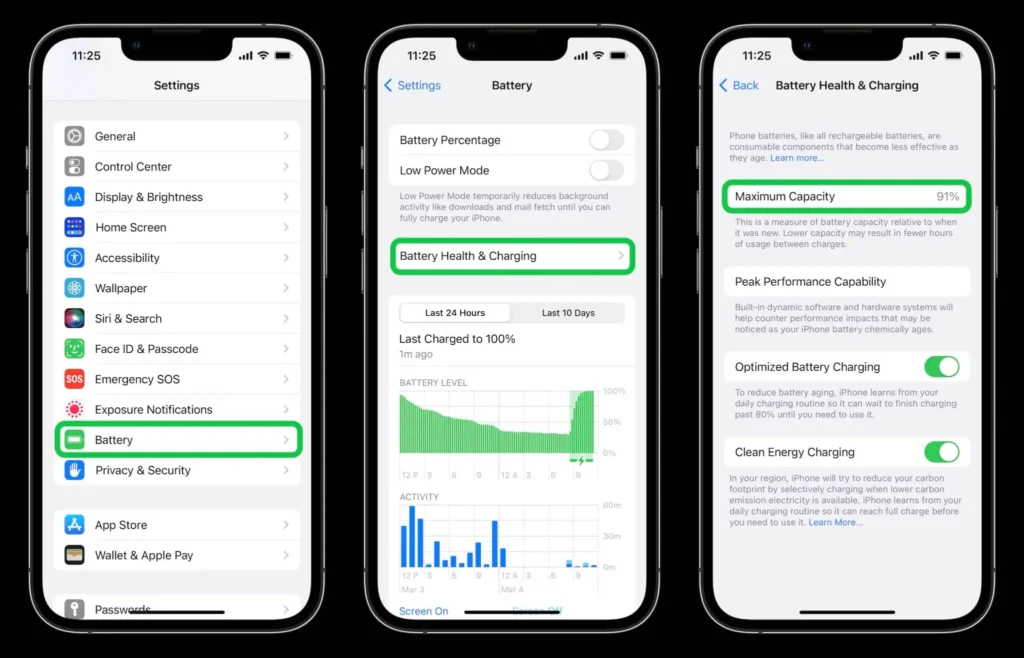
How to check battery health before buying a used phone:
- iPhone: Go to Settings > Battery > Battery Health & Charging. Look for “Maximum Capacity” — ideally 85% or above for a satisfying experience
- Android: Dial the manufacturer’s diagnostic code (like *#*#4636#*#* on many Android phones) or use a trusted battery app to check battery cycle count and health percentage
- Ask the seller directly for original battery verification — was the battery replaced, and if so, with an OEM or third-party part?
- Run a short battery drain test: use the camera and screen brightness at max for 15–20 minutes and see how fast the percentage drops
| Battery Health % | What It Means |
| 90–100% | Excellent — near original performance |
| 85–89% | Good — normal for a well-maintained refurbished phone |
| 80–84% | Acceptable — expect slightly faster daily drain |
| Below 80% | Risky — ask for battery replacement or price reduction |
A trustworthy seller will disclose the battery health percentage upfront as part of their inspection report — this is what battery health disclosure actually means in practice, and it’s a strong signal of a transparent refurbishment process.
Also Read – How to Check Battery Health Before Buying a Refurbished iPhone (2026 Guide)
4. Cameras and Sensors: The Deal-Breaker for Camera Lovers
If you’re buying a refurbished phone specifically for photography or video, this step deserves extra attention. Camera functionality test and sensor checks are non-negotiable.
Camera functionality test checklist:
- Open the camera app and test every lens: main, ultra-wide, telephoto, and front camera
- Check autofocus by pointing at objects at different distances
- Test flash, night mode, and portrait mode
- Record a short video and play it back — check for shake, blur, or audio sync issues
- Zoom in fully and check for haze, spots, or a foggy patch (a sign of internal lens damage)
Sensor checks that people forget:
- Face ID and fingerprint test: Set up Face ID or fingerprint unlock and try it in different lighting. A “genuine” but failing Face ID often means the TrueDepth sensor was tampered with during repair
- Proximity sensor test: Make a call and bring the phone to your ear — the screen should turn off automatically. If it doesn’t, the proximity sensor may be faulty
- Microphone test: Record a voice memo and play it back, or make a test call and ask the other person if your voice sounds clear
- Speaker test: Play music or a video at full volume and check both the earpiece and the loudspeaker for distortion or crackling
- Vibration test: Enable vibration and send yourself a message or set an alarm
A genuinely well-refurbished phone should pass every single one of these without hesitation.
5. Test the Charging Port and Charging Speed
A weak or damaged charging port is one of the most common — and most overlooked — used phone problems.
How to test charging port and speed:
- Plug in the original or a compatible fast charger and note how quickly the battery percentage rises in 10 minutes
- Wiggle the cable gently while charging — if the connection cuts in and out, the port is damaged or has debris inside
- Try both wired and wireless charging (if supported) to confirm both work
- Check the charging port visually with a flashlight for lint, corrosion, or bent pins
- Test with more than one cable, since a faulty cable can be mistaken for a faulty port
If charging speed test results seem unusually slow compared to the phone’s rated specs, it could mean a non-original charging chip was used during repair — another reason to ask the seller for OEM components confirmation.
6. Network and Connectivity: SIM, Wi-Fi, Bluetooth, and GPS
A phone can pass every visual test and still fail here — and this is one area many buyers simply forget to test SIM functionality and connectivity properly before it’s too late to return the device.
Full connectivity test checklist:
- SIM and cellular signal test: Insert your SIM and make a test call, send an SMS, and check signal bars compared to your old phone in the same location
- Check 5G connectivity: If the phone supports 5G, confirm it actually connects to a 5G network in your area (some refurbished units have a locked or disabled modem)
- Wi-Fi test on used phone: Connect to your home Wi-Fi and run a speed test to confirm normal performance
- Bluetooth functionality: Pair it with earphones or another device and play audio for a few minutes
- GPS testing smartphone: Open Google Maps and confirm your location locks accurately within a few seconds
- eSIM compatibility check: If you plan to use eSIM, confirm the phone supports and can activate one (some refurbished imports have eSIM disabled)
If any of these fail, it usually points to a replaced antenna, modem, or motherboard component — a serious issue that should either be fixed by the seller or should void the sale.
Also Read – The Checklist Before Buying Refurbished Phones In India (2026 Guide)
7. Software, Locks, and Signs of Previous Repair
This final step is about what you can’t see on the surface — the software and hardware history of the phone.
Software and lock checks:
- Check iCloud lock (iPhone): Go to Settings > General > About — it should say “This iPhone can be erased and activated by a new owner.” If it shows a previous Apple ID, do not buy it
- Google account lock (Android): Perform a factory reset (with seller’s permission) and confirm the phone doesn’t ask for a previous Google account — this checks for factory reset protection (FRP)
- Software update verification: Check that the phone can install the latest available OS update, confirming it isn’t running a modified or region-locked firmware
- Phone activation status: Confirm the device activates properly with your SIM and carrier
- Malware check smartphone: Scan with a trusted antivirus app, especially on Android, to rule out pre-installed malicious software
- Device management lock: On Android, check Settings > Security for any active Mobile Device Management (MDM) profile left behind by a previous owner or company
Physical signs of a repaired phone:
- Screws around the frame that look scratched or mismatched
- Slightly misaligned side buttons or a loose SIM tray
- Adhesive residue near the edges of the screen or back panel
- A slightly thicker phone body (sign of a non-original battery or back glass)
If you can, ask the seller directly: “Has this phone been repaired before, and what parts were replaced?” A transparent seller will answer honestly — this is where device history verification really counts.
Refurbished Phone vs Used Phone: What’s the Real Difference?
Buyers often confuse “used phone” with “professionally refurbished phone,” but they’re not the same thing at all.
| Factor | Used Phone (Peer-to-Peer) | Professionally Refurbished Phone |
| Inspection | Usually none | Multi-point inspection before listing |
| Battery Health | Unknown, undisclosed | Battery health percentage usually disclosed |
| Parts Used | Unknown history | OEM or verified replacement parts |
| Warranty | Rarely offered | Often comes with warranty coverage |
| Return Policy | Rarely offered | Return window usually included |
| IMEI Check | Buyer must verify alone | Often pre-verified by seller |
| Risk Level | High | Lower, if bought from a verified refurbished phone marketplace |
This is exactly why “Is refurbished better than used?” comes up so often in searches — and the honest answer is: a professionally refurbished, quality-tested device is almost always the safer choice over a random used phone with zero inspection history.
Real-World Example: A Common Refurbished Phone Scam in India
Here’s a pattern that shows up again and again in Indian marketplaces.
A buyer purchases a “Grade A” refurbished iPhone online. The listing photos look flawless. On delivery, the phone powers on, the screen looks new, and the buyer is satisfied — until two weeks later.
The battery starts draining from 100% to 20% in under four hours. On checking Settings > Battery Health, the maximum capacity reads 71%. The seller had never disclosed the real battery condition, and by the time the buyer noticed, the return window had already closed.
The lesson: always test a refurbished phone within the first 24–48 hours, not weeks later. Most return policies are time-bound, and testing early is your best protection.
What Should You Test Immediately After Your Refurbished Phone Arrives?
This is one of the most common AI-search and voice-search questions people ask, so here’s a clear, quick-reference answer.
Within the first hour of delivery:
- Check the IMEI against the box and *#06#
- Inspect the display for dead pixels, scratches, and touch response
- Check battery health percentage
- Test the camera, speakers, and microphone
- Insert your SIM and confirm network and Wi-Fi connectivity
- Confirm there’s no iCloud lock or FRP lock
If everything passes, you’re likely holding a genuinely quality-tested device. If even one item fails, contact the seller immediately and use your return window before it closes.
How Trusted Sellers Like Refone Reduce Your Risk
You can do everything on this refurbished phone buying checklist yourself — and you should. But the smartest move is also choosing where you buy from in the first place.
A reliable, verified refurbished phone marketplace typically offers:
- A documented multi-point inspection before the phone is ever listed
- Transparent battery health disclosure, shown to you before purchase
- IMEI verification and ownership checks done in advance
- Warranty coverage and a clear return policy, so you’re protected even if something slips through
- Condition grading (like Grade A, B, or C) that’s applied honestly, not just for marketing
This is the standard Refone works toward — hands-on device testing, transparent refurbishment standards, and honest condition grading, so buyers get a professionally tested device instead of a gamble. When a seller is upfront about what’s been checked and what’s covered under warranty, you get to skip a lot of this anxiety altogether.
Frequently Asked Questions
Q1- What should I check before buying a refurbished phone?
Check the IMEI and serial number, display and touchscreen, battery health, cameras and sensors, charging port, network connectivity, and software locks like iCloud or Google FRP. These seven checks cover almost every common issue buyers face.
Q2- How do I test a refurbished phone?
Start by verifying the IMEI with *#06#, then test the screen for dead pixels, check battery health in your phone’s settings, test all cameras and sensors, check the charging port and speed, confirm SIM and Wi-Fi connectivity, and finally confirm there’s no previous account lock.
Q3- How can I verify that a refurbished phone is genuine?
Match the IMEI on the box, SIM tray, and in the phone’s settings using *#06#. Cross-check it on an official IMEI verification portal to confirm it isn’t blacklisted or reported stolen, and confirm the phone isn’t locked to a previous owner’s account.
Q4- How do I check the IMEI of a used phone?
Dial *#06# on the phone to display the IMEI instantly. You can also find it in Settings > General > About (iPhone) or Settings > About Phone (Android), then compare it with the number printed on the retail box.
Q5- How can I tell if a phone has been repaired?
Look for mismatched or scratched screws, a slightly raised or misaligned screen, adhesive residue near the edges, uneven brightness, or a thicker-than-normal body. You can also ask the seller directly for a repair or replacement-parts disclosure.
Q6- How do I check battery health before buying?
On iPhone, go to Settings > Battery > Battery Health & Charging and check the Maximum Capacity percentage. On Android, use the built-in battery stats or a trusted diagnostic app to check cycle count and health percentage. Aim for 85% or higher.
Q7- What are the signs of a bad refurbished phone?
Warning signs include a mismatched IMEI, poor battery health below 80%, a faulty camera or sensor, a loose charging port, missing 5G or Wi-Fi connectivity, and any active iCloud or Google account lock from a previous owner.
Q8- How do I check if an iPhone has original parts?
Go to Settings > General > About and check for a “Parts and Service History” or “genuine display/battery” notice, which flags non-original components on newer iOS versions. You can also ask the seller for OEM component verification in writing.
Q9- Is it safe to buy a refurbished phone online?
Yes, if you buy from a verified refurbished phone marketplace that offers IMEI verification, battery health disclosure, warranty coverage, and a clear return policy — and if you personally run through this 7-point checklist as soon as the phone arrives.
Q10- What should I test immediately after receiving a refurbished phone?
Within the first hour, check the IMEI, inspect the display, check battery health, test the cameras and speakers, confirm SIM and Wi-Fi connectivity, and check for any account locks — all before your return window closes.
Q11- Refurbished phone kharidne se pehle kya check karna chahiye?
IMEI number, display aur touchscreen, battery health, camera, charging port, network connectivity, aur software locks (jaise iCloud ya Google FRP) — ye saat cheezein zaroor check karein before buying.
Q12- Refurbished phone genuine hai ya nahi kaise pata chalega?
Phone ka IMEI number *#06# dial karke check karein, aur usse box aur SIM tray par likhe IMEI se match karein. Iske alawa ek trusted IMEI verification website par bhi check kar sakte hain.
Q13- Battery health kaise check karein purchase se pehle?
iPhone mein Settings > Battery > Battery Health & Charging mein maximum capacity dekhein. Android mein diagnostic code ya trusted app se battery cycle count aur health percentage check karein. 85% ya usse zyada acha maana jaata hai.
Q14- Second hand phone repair hua hai ya nahi kaise pata chalega?
Screws ka scratch hona, screen ka thoda uthaa hua lagna, edges par glue ke nishaan, ya body ka thoda mota lagna — ye sab signs batate hain ki phone pehle repair ho chuka hai.
Q15- Kya refurbished phone online kharidna safe hai?
Haan, agar aap ek trusted aur verified seller se kharid rahe hain jo IMEI verification, battery health disclosure, warranty, aur return policy deta ho — aur delivery ke turant baad khud bhi ye checklist follow karein.
Final Checklist: Don’t Get Scammed
Before you make the final call on any refurbished phone, run through this one more time:
☐ IMEI matches box, SIM tray, and *#06#
☐ Display has no dead pixels or touch issues
☐ Battery health is 85% or above
☐ Camera, Face ID/fingerprint, and proximity sensor all work
☐ Charging port and speed are normal
☐ SIM, 5G, Wi-Fi, Bluetooth, and GPS all connect properly
☐ No iCloud lock, Google account lock, or FRP lock present
☐ Seller offers a written warranty and return policy
If a phone checks every box, you’ve likely found a genuinely well-refurbished device worth your money.
Conclusion: Buy Smart, Not Sorry
A refurbished phone can be one of the smartest purchases you make this year — lower price, solid performance, and often a camera and display good enough to rival brand-new flagships. But that value only holds up if you actually test what you’re buying.
Don’t rely on photos. Don’t rely on trust alone. Run through this refurbished phone buying checklist every single time, whether you’re buying your first pre-owned phone or your fifth.
And if you’d rather skip the guesswork entirely, Refone stands for exactly what this checklist demands: honest inspection, transparent battery health disclosure, and warranty-backed refurbished phones — so you can buy with confidence, not crossed fingers.
Ready to buy your next refurbished phone the smart way? Explore Refone’s quality-tested, IMEI-verified, warranty-backed devices today — and get a phone that’s been checked the way this article just taught you to check it yourself.
Leave a Reply
Your email address will not be published. Required fields are marked *