 Download App
 Track Order
 Help Center


iPhone 14 Pro Max Microphone Not Working? Causes, Fixes and Repair Guide (2026-27)
iPhone 14 Pro Max microphone not working? Start here
You pick up an important call. The person on the other side keeps saying, “Hello? Awaaz nahi aa rahi.” Your screen is perfect. Your phone cost over a lakh. But your voice has disappeared.
If your iPhone 14 Pro Max microphone not working is the reason you are here, take a breath. In most cases the cause is small: a blocked grille, a wrong setting or a software glitch. Sometimes it is real hardware damage. This guide helps you find out which one, in about 10 minutes and without spending money.
Quick answer: why is my iPhone 14 Pro Max microphone not working?
The most common causes are dust or debris in the microphone grille, a case or screen protector covering it, blocked microphone access permissions, an iOS software glitch, Bluetooth audio routing to another device, and, less often, liquid damage or failed microphone hardware. Restart the phone, clean it safely, check permissions and run a quick audio recording test. If your voice is still not picked up, get a professional iPhone microphone diagnosis. Any iPhone sound problem or iPhone audio issue is easier to fix once you know which microphone is affected.
What does an iPhone 14 Pro Max mic problem look like?
An iPhone 14 Pro Max microphone issue, or plain iPhone mic not working, shows up in different ways. See which one matches yours:
- iPhone 14 Pro Max microphone not working during calls: the other person hears nothing. This is the classic iPhone mic problem during calls, where your iPhone voice not audible during calls is the main complaint.
- iPhone 14 Pro Max voice not heard by other person: they hear you only sometimes, or very faintly, and the iPhone 14 Pro Max microphone not picking up voice properly. Call audio quality drops fast.
- iPhone 14 Pro Max mic not working on WhatsApp, or iPhone 14 Pro Max mic not working in FaceTime, while normal calls are fine.
- iPhone 14 Pro Max microphone not working on speaker mode, or only working on speaker.
- iPhone 14 Pro Max microphone not recording voice: an iPhone microphone not recording sound is a classic iPhone voice recording problem and a Voice Memos recording issue.
- iPhone 14 Pro Max video recording microphone problem: the video looks great but the audio is silent or weak.
- iPhone 14 Pro Max microphone producing muffled sound, with distorted voice recording or low microphone volume.
- iPhone 14 Pro Max microphone stopped working suddenly, or iPhone 14 Pro Max microphone works intermittently.
- iPhone 14 Pro Max bottom microphone not working or iPhone 14 Pro Max front microphone not working, while the others still respond.
- iPhone 14 Pro Max microphone issue after iOS update: the iPhone microphone not working after update, with no drop or water in sight. It is an iPhone audio input failure: voice input not detected.
Each symptom often points to a different microphone or cause.
Buy Certified Refurbished iPhone
Super Quality iPhones at Smarter Prices
iPhone 14 Pro Max common microphone problems and their causes
Your phone is not one microphone. It has separate microphones, usually at the bottom, at the front near the earpiece and at the back near the camera. Calls, selfies and rear videos can each depend on a different one. So an Apple iPhone microphone problem can look partial. That helps you diagnose it.
| Likely cause | Typical sign | Try this first |
| Microphone grille blockage, dust and debris inside microphone | Muffled microphone sound, low microphone volume | Safe microphone cleaning |
| Case or screen protector covering a mic | Only one microphone is weak | Remove the case, test again |
| Microphone access permissions turned off | App-only problem, such as WhatsApp | Check privacy settings |
| iOS software glitch | Sudden failure, often after an update | Restart, then update iOS |
| Bluetooth audio routing | Voice goes to earbuds or a car | Disconnect Bluetooth |
| Wrong audio input settings | Voice sounds odd in calls | Switch Mic Mode to Standard |
| Liquid damage | Distorted or no sound, other faults too | Switch off, get inspection |
| Microphone hardware damage | Nothing helps, voice input not detected | Professional repair |
Real-world pattern: when the voice fails only in one app, it is usually settings. When it fails everywhere, even in Voice Memos, think hardware or iOS. This is why an audio recording test is your best first move.
Your top questions, answered
Why is my iPhone 14 Pro Max microphone not working?
Usually because of a blocked microphone, a permission problem, a software glitch or Bluetooth audio routing. Hardware damage is the last thing to suspect, not the first.
Why can’t people hear me during calls on my iPhone?
Check three things: is a Bluetooth device connected, is the bottom microphone blocked, and is the phone’s audio input working in Voice Memos. If it records fine there, the problem is calls or settings, not hardware.
Why is my iPhone microphone working on speaker but not normal calls?
Speaker mode and normal calls can use different microphone paths. A blocked or damaged bottom microphone, or a mic problem near the earpiece, can cause this. Test both, then clean safely.
Can an iOS update cause microphone problems?
Yes. An iOS software glitch after an update can reset audio input settings or microphone access permissions. Restart first, then install the latest iOS version, because small updates often fix audio bugs.
Can water damage affect iPhone microphone performance?
Yes. Liquid damage can corrode the microphone or the board around it. Symptoms may appear days later. If your phone got wet, switch it off and do not use rice or heat. Get it inspected.
How can I check if my iPhone microphone is damaged?
Run the same recording on all microphones. If audio is silent or distorted everywhere, even after cleaning and a restart, microphone hardware damage is likely. A technician can confirm it.
Why is my voice unclear in iPhone video recordings?
A dirty rear or front microphone is the usual reason. Wipe the openings with a dry, soft cloth, remove the case and film another short clip. Wind and loud rooms also reduce sound recording quality.
When should I replace my iPhone microphone?
When cleaning, a restart, an iOS update and a reset do not help, and a diagnosis points to hardware. That is the point where microphone replacement makes sense, ideally with genuine parts and a warranty.
How to fix microphone problem on iPhone 14 Pro Max (9 steps)
Here is the iPhone 14 Pro Max mic problem fix that most technicians try first. It also answers how do I fix the microphone on my iPhone 14 Pro Max? and how to fix iPhone 14 Pro Max mic.
- Restart your iPhone. It clears many temporary glitches.
- Remove the case and screen protector. A thick cover can block the bottom microphone.
- Do a safe microphone cleaning. Use a dry, soft brush or a clean toothbrush. Never push a pin or needle into the grille, and keep liquids away.
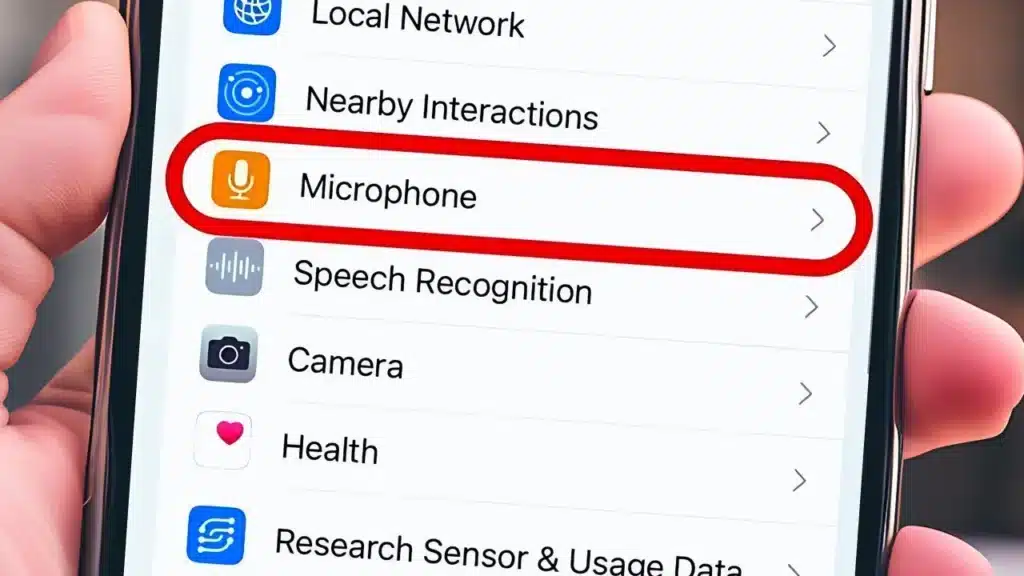
- Check microphone access permissions. Open Settings, then Privacy & Security, then Microphone. Turn the switch on for WhatsApp, FaceTime and other apps.
- Disconnect Bluetooth. Check Bluetooth audio routing, since your phone may be sending your voice to earbuds or a car.
- Check the audio input settings. During a call or FaceTime, open Control Center, tap Mic Mode and choose Standard.
- Update iOS. Go to Settings, General, Software Update. This is the main fix when the iPhone microphone stopped working after an update.
- Reset all settings. Settings, General, Transfer or Reset iPhone, Reset, Reset All Settings. This keeps your data. Back up first anyway.
- Stop and book a diagnosis if nothing works. More tinkering only adds risk.
How to test microphone on iPhone 14 Pro Max
How do I test all microphones on an iPhone 14 Pro Max? Do this microphone functionality test in two minutes:
- Voice Memos: record 10 seconds and play it back. This usually tests the bottom microphone.
- Front camera video: record yourself talking. This checks the front microphone.
- Rear camera video: record a clip of someone speaking. This checks the rear microphone.
- Speaker call: call a friend on speaker mode and ask if they hear you clearly.
If your microphone works in Voice Memos but not during calls, check Bluetooth, Mic Mode and call-related permissions first. If every test fails, it is likely hardware.
When to get professional iPhone repair
Home fixes solve many cases. But some problems need tools and training. Stop DIY if you see liquid damage, no sound on any test, or crackling that does not go away.
A good professional iPhone microphone diagnosis should include:
- iPhone hardware inspection and microphone hardware inspection under magnification
- iPhone diagnostic testing and microphone functionality testing on every microphone
- iPhone audio troubleshooting that separates software from hardware
- Safe microphone cleaning, not poking or spraying liquids
- An iPhone hardware repair assessment with a written quote
If your phone is still under Apple warranty, check Apple-authorised service options first. Outside warranty, ask any shop these questions before you hand over your phone:
- Do you use genuine replacement parts? Ask what that means in writing.
- Is there an iPhone repair warranty, and for how long?
- Do you do an iPhone repair quality check after the work, with a test call and recording?
- Is it professional iPhone repair, done by a named technician?
How much does iPhone 14 Pro Max microphone repair cost?
There is no single price. iPhone mic repair cost depends on which microphone failed, the part quality and whether other damage exists. Ask for a quote after diagnosis, not before. Be careful with very cheap offers, because they often mean low-grade parts.
Should I repair my iPhone microphone or replace the phone?
Here is a simple rule of thumb, not a law:
| Situation | Better choice |
| One microphone fails, rest of phone is healthy | Repair |
| Quote is a small share of the phone’s value | Repair |
| Liquid damage with several faults | Consider replacing |
| Repair quote is close to the price of a good refurbished phone | Replace |
| You wanted to upgrade anyway | Upgrade |
Where to get help in Howrah
Searching on your phone for iPhone microphone repair near me? You will see many results. Here is how to use the search smartly:
- iPhone 14 Pro Max microphone repair in Howrah: ask whether they test all three microphones before quoting.
- iPhone mic repair shop in Howrah and iPhone microphone technician in Howrah: ask who actually does the work.
- iPhone 14 Pro Max repair shop Howrah and Apple iPhone repair in Howrah: ask for parts details and warranty.
- iPhone audio problem repair Howrah and iPhone microphone replacement Howrah: insist on a written diagnosis first.
- iPhone service centre in Howrah and iPhone repair shop near Howrah AC Market: visit, check the counter and see the testing process.
Refone has a store at Howrah AC Market. Call +91 90444 47828 and ask whether they can test your iPhone microphone and what the options are before you travel.
Why Indian iPhone users trust Refone
Refone sells Grade A refurbished iPhones with a 12-month written warranty and a 7-day replacement policy. Every phone is tested before sale, including the microphone. That matters. A faulty microphone is a fault you should never discover after paying.
If your 14 Pro Max is beyond a sensible repair, a tested refurbished iPhone can be a smart next step. You get Apple’s ecosystem, a warranty and a clear test record.
Quick Answers
“My iPhone 14 Pro Max microphone is not working. Can you help me fix it?” Yes. Follow the 9 steps above, then book a diagnosis if it still fails.
“People cannot hear me during phone calls on my iPhone 14 Pro Max. What is the reason?” Usually a blocked bottom microphone, Bluetooth or a glitch.
“My iPhone 14 Pro Max records videos without clear audio. How can I solve this?” Clean the openings, remove the case and film again.
“How can I check whether my iPhone 14 Pro Max has a microphone hardware problem?” Record on every microphone. If all fail after a restart and update, it is likely hardware.
“My microphone works in Voice Memos but not during calls. What should I check?” Bluetooth, Mic Mode, permissions and the front microphone.
“Why does my iPhone 14 Pro Max microphone sound muffled?” Dust, a case, a screen protector or moisture.
“Can dust or water damage stop an iPhone microphone from working?” Yes. Dust muffles it, and liquid can break it.
“What are the most common reasons for an iPhone 14 Pro Max microphone failure?” Blockage, glitches, permissions, Bluetooth, liquid damage and worn hardware.
“Should I get my iPhone 14 Pro Max microphone repaired or replaced?” Repair if only the microphone failed and the quote is fair.
“What can I try before visiting an iPhone repair technician?” Restart, clean, check permissions, disconnect Bluetooth and update iOS.
Frequently asked questions
1- Why can’t anyone hear me on my iPhone 14 Pro Max?
Most often a blocked microphone, a Bluetooth connection or a glitch. Remove the case and restart first.
2- My iPhone microphone suddenly stopped working, what should I do?
Restart, check Bluetooth, clean the grille and update iOS. If it stays silent, get it inspected.
3- How can I fix my iPhone mic at home?
Follow the 9 steps above. Avoid sharp tools and liquids.
4- Why does my voice sound low during iPhone calls?
Dust, a cover or the wrong Mic Mode can lower your volume. Clean safely and choose Standard.
5- Why is my iPhone not recording my voice in videos?
Check for blocked openings, then test video with the front and rear cameras. Permissions matter for third-party camera apps.
6- How do I know if my iPhone microphone is damaged?
If every recording test fails after a restart, an update and cleaning, damage is likely.
7- Can dust block my iPhone microphone?
Yes. Dust is a very common cause of low or muffled sound.
8- Why is my microphone not working after an iOS update?
A software glitch can change settings. Restart, update again and reset all settings if needed.
9- What should I do if my iPhone mic works sometimes?
Intermittent faults often mean a loose connection, moisture or a failing part. Do a diagnosis.
10- How do I clean my iPhone microphone safely?
Use a dry soft brush. Do not use needles, water or strong air.
Conclusion
Most cases of iPhone 14 Pro Max microphone not working are fixable with patience and the right order: restart, clean, permissions, Bluetooth, update, test. Only then should you think about hardware, repair or upgrade.
Do not ignore the problem. Missed calls, silent videos and frustrated family are expensive in their own way. And never let a shop guess. Ask for a diagnosis and a warranty.
Need a reliable iPhone? Talk to Refone
Not sure whether to repair or replace? Visit Refone or call +91 90444 47828 and speak to a real person at the Howrah AC Market store. Ask for a tested iPhone with a 12-month written warranty, and ask us anything before you pay.
Our promise: Refone only recommends what you actually need. If a repair is enough, we will tell you so.
Leave a Reply
Your email address will not be published. Required fields are marked *