 Download App
 Track Order
 Help Center


How to Check iPhone Parts and Service History Before Buying a Refurbished iPhone
You found a refurbished iPhone for ₹28,000. It looks spotless. The seller says, “100% original, bhai.”
Two weeks later, Face ID stops working. The battery drops to 60% by evening. And the “original” screen? It was replaced months ago.
Here is the painful part: your iPhone could have told you all this in 30 seconds. Before you paid.
Every iPhone keeps a record of its repairs. Apple calls it Parts and Service History. If you know where to look and what the labels mean, you can avoid most of the nasty surprises when you buy a refurbished iPhone in India.
This guide shows you exactly how to do it, step by step, in simple words.
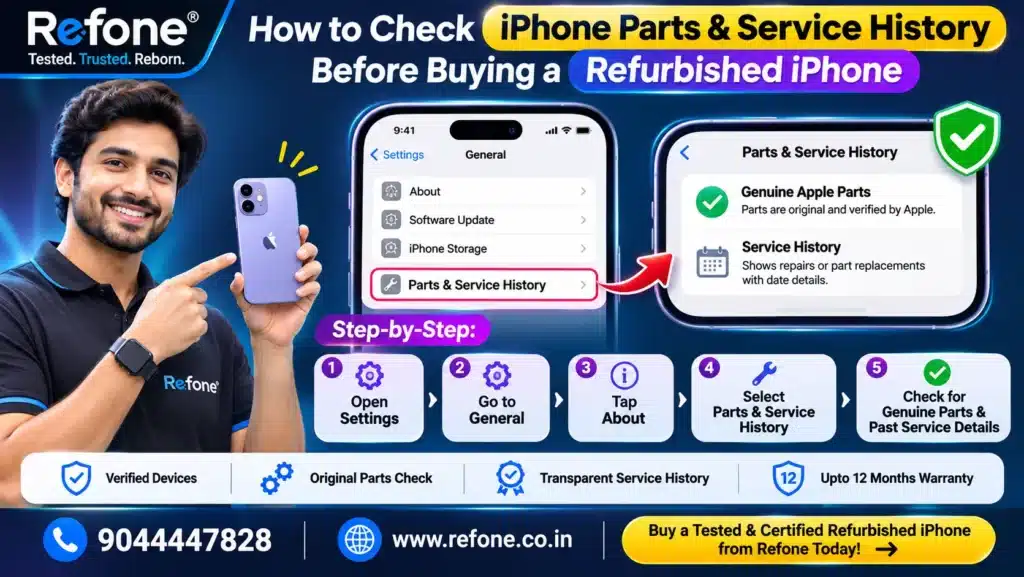
Quick Answer: How Do You Check iPhone Parts and Service History?
Open Settings → General → About on the iPhone. Scroll down to Parts and Service History. You will see a label like Genuine, Used or Unknown next to parts such as the battery, display or camera. This works on iOS 15.2 and later.
If the section is missing, the iPhone usually has no repair recorded. That is a good sign, but it is not the only check you should do.
Buy Certified Refurbished iPhone
Super Quality iPhones at Smarter Prices
What Is iPhone Parts and Service History?
It is a section inside your iPhone’s settings that shows whether important parts were replaced, and whether the replacement was done with genuine Apple parts and processes.
According to Apple’s own support pages, you can see details for these parts, depending on the model:
- Battery
- Display
- Camera (iPhone 12 and later)
- Logic Board (the main board of the phone)
Battery and display history is available on iPhone 11 models and later, except iPhone SE (2nd and 3rd generation). If a part was serviced more than once, only the most recent service is shown.
Think of it like the service book of a used car. It does not tell you everything, but it tells you what the seller may not.
Why This Matters When You Buy a Refurbished iPhone in India
The refurbished iPhone market in India is huge. People search for terms like “refurbished iPhone“, “iPhone refurbished India” and “buy refurbished iPhone” every single day because a new iPhone is out of budget for many families.
But “refurbished” is not a protected word. Anyone can use it.
Let’s be clear about the refurbished iPhone meaning. A refurbished iPhone is a pre-owned phone that has been tested, repaired where needed, cleaned and resold. The quality depends fully on who refurbished it and what parts they used.
That is why Parts and Service History is your first line of defence.
New vs Refurbished vs Second Hand vs Pre-Owned iPhone
| Type | What it means | Repair record | Risk level |
| New | Sealed, never used | None | Lowest, but highest price |
| Certified refurbished iPhone | Tested and repaired by a verified process | Should be disclosed | Low to medium, depends on the certifier |
| Pre owned iPhone (from a trusted seller) | Used, checked and graded | Ask the seller to show it | Medium |
| Second hand iPhone (from a stranger) | Sold as-is, no checks | Unknown | Highest |
Want the full breakdown? Read our guide on refurbished vs second hand iPhone.
How to Check iPhone Parts and Service History: Step by Step
You need the phone in your hand, an internet connection and about two minutes.
Step 1: Open the Right Screen
Go to Settings → General → About. Scroll to the bottom of the details list. Look for Parts and Service History.
Step 2: Read the Label Next to Each Part
Tap each part to see more details. Apple says that after service is done and the iPhone connects to the internet, you can tap a part for more information, including the service date.
Step 3: Match the Label With the Table Below
| Label | What it means | Should you worry? |
| Genuine | Repaired with genuine Apple parts and processes | No. This is the best result. |
| Used | The part was already used in another iPhone (shown on newer models) | Ask the seller why and from which phone |
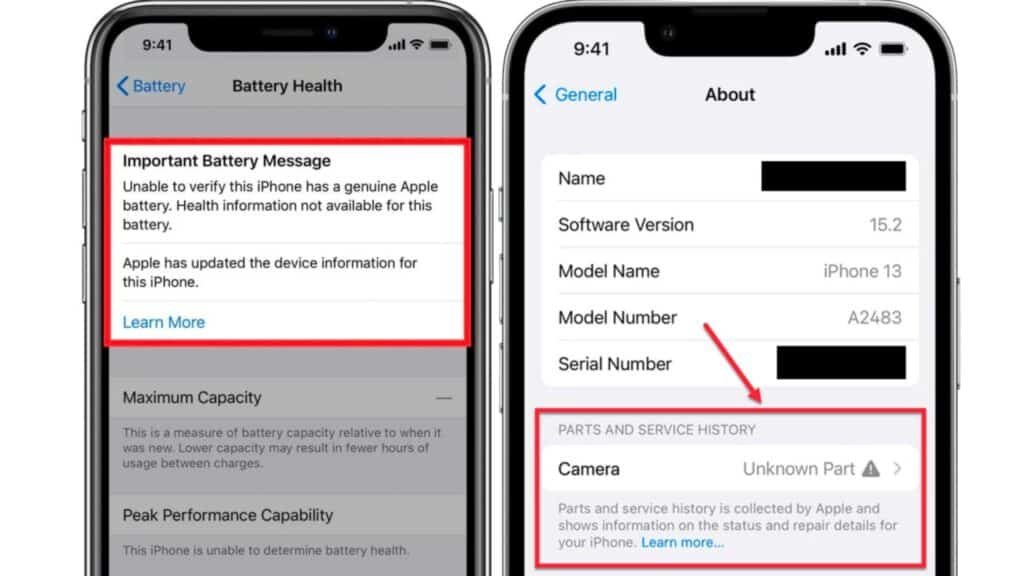
| Unknown | Part may be non-genuine, not working as expected, or not verified | Yes. Ask questions or walk away. |
| Finish Repair | Genuine part installed, but the repair was never completed with Repair Assistant | Ask the seller to finish it first |
| Unverified (Logic Board) | Main board was previously used in another iPhone | Serious red flag. Features like Apple Pay may be affected. |
Source: Apple Support. Labels and availability can change with iOS updates.
Step 4: Do Not Panic If the Section Is Missing
Parts and Service History shows only if a part was replaced or is not working as expected. No section usually means no recorded repair.
But there is a catch. Older iPhones (like an iPhone X or iPhone 8) and iOS versions older than 15.2 show far less. For them, you must lean on the physical and battery checks below.
The 7-Point Checklist Beyond Parts and Se rvice History
Parts history is one piece of the puzzle. Here is how to check an iPhone completely before you pay.
1. Check Battery Health (Properly)
Go to Settings → Battery → Battery Health. Apple designs iPhone batteries to keep up to 80% of their original capacity after 500 complete charge cycles (up to 1,000 cycles on iPhone 15 and later).
So is iPhone battery health 85% good or bad? For a used phone, 85% is usually fine. You will get a decent day of use. Below 80%, expect a battery replacement soon.
A battery showing 100% on an older iPhone is not always bad news. It may simply be a genuine replacement, which is perfectly fine if disclosed. Read more in our guide: Is 85% battery health good on an iPhone?
2. Do an IMEI Check on the iPhone
Dial *#06# or open Settings → General → About to see the IMEI. Then:
- Match it with the IMEI printed on the box and the SIM tray.
- Check it on India’s government portal, Sanchar Saathi, to confirm the phone is not reported lost or stolen.
- Never buy if the seller refuses to show the IMEI.
3. Check Activation Lock
An iPhone with iCloud Activation Lock is a brick for anyone except the old owner. Make sure Find My iPhone is off and the phone is signed out of the previous Apple Account. Apple also offers an Activation Lock status check on its website.
4. Check Warranty and Coverage
Enter the serial number on Apple’s coverage-check page to see the model, activation date and warranty status. It also helps you confirm the phone is what the seller claims. This is a solid way to check if an iPhone is original or fake.
5. Test the Display
Look for dead pixels, yellow tint, touch lag and a white spot on the iPhone screen. White or dark spots often point to pressure damage or a poor display replacement. Here is a detailed explanation: white spot on mobile screen: causes and fix.
Also test True Tone and auto-brightness. Non-genuine displays often fail here.
6. Test Face ID, Cameras and Speakers
Set up Face ID. Record a video with the front and back cameras. Make a test call on speaker. Charge it for a few minutes. Face ID and camera faults are very costly to fix later.
7. Ask for the Box, Bill and Warranty in Writing
A refurbished iPhone with original box is a nice bonus, not a guarantee. What matters more is a proper invoice, a written warranty and a clear return policy.
Red Flags: What You See and What It May Mean
| What you see | What it may mean | What to do |
| “Unknown Part” next to Display | Non-genuine or unverified screen | Ask for proof, or skip |
| Unverified Logic Board message | Board taken from another iPhone | Walk away |
| Battery at 100% on a 3-year-old iPhone | Replaced battery (may or may not be genuine) | Check the label and ask for disclosure |
| Seller won’t let you open Settings | They are hiding something | Walk away |
| Price far below market | Locked, stolen or heavily repaired phone | Verify IMEI and Activation Lock |
| Phone is “too clean” with no box, bill or warranty | Unverified source | Ask for the seller’s proof |
| “Grade D iPhone” sold at a Grade A price | Cosmetically worn but overpriced | Compare grading and price |
Is a Replaced Part Always a Bad Sign?
No. And this is where most guides are too one-sided.
Refurbishing means fixing things. A refurbished iPhone with a Genuine battery or display is often a better buy than an old phone with a tired original battery.
The real question is not “was it repaired?” The real question is:
- Was the part genuine?
- Was the repair disclosed?
- Is there a warranty backing it?
An honest seller says, “Yes, the battery was replaced, here is the screenshot.” A shady seller says, “Nothing was ever opened.”
What to Check on Popular Models Indian Buyers Ask About
Most buyers look at a budget first, then a model. Here is how that usually plays out:
| Budget / Search | Popular choice | What to check first |
| iPhone 25000 to 30000, iPhone under 30000 | iPhone 12 and iPhone 13 class devices | Battery label, display label, Face ID |
| iPhone under 50000 | iPhone 14 Pro, refurbished iPhone 15 | Camera label, battery cycle count |
| Latest models (refurbished iPhone 16, 17) | Newer iPhones | Logic board, “Used” labels, warranty status |
Prices change every week, so always compare live listings. For example, the iPhone 13 second hand price can differ by several thousand rupees between sellers.
Useful reads: best refurbished iPhone under ₹30,000, second hand iPhone 13 price in India and best iPhone under ₹50,000.
A Real-World Example (Illustrative)
Rahul from Kolkata wanted an iPhone 13 under ₹30,000. He found two offers.
Phone A was cheaper by ₹2,500. The seller said, “Original hai, no problem.”
Phone B was from a refurbisher who showed the Parts and Service History screenshot, IMEI, battery health and invoice before payment.
Rahul checked Phone A on his own. The display showed Unknown Part and the battery was at 79%. The cheaper phone would have needed a new screen and battery within months.
He paid the extra ₹2,500 for Phone B. The saving on Phone A was an illusion.
This is a representative scenario based on common buyer experiences, not a customer testimonial.
Where to Buy a Refurbished iPhone Safely
Searches like “best refurbished iPhone sites in India”, “trusted second hand iPhone seller” and “where to buy refurbished iPhone” keep growing. That tells us one thing: people are worried about trust.
Whoever you buy from (a refurbisher, a marketplace such as Flipkart refurbished, or a local shop), ask these questions:
| Question | Good answer | Bad answer |
| Can I see Parts and Service History before paying? | “Sure, here it is.” | “Don’t worry, it’s fine.” |
| Which parts were replaced? | A clear, honest list | “Nothing” or no answer |
| Are the replaced parts genuine? | Documented proof | Vague promises |
| What is the warranty and return window? | Written, with dates | Verbal only |
| Is the IMEI clean and Activation Lock off? | Yes, with proof | Hesitation |
| Do you offer refurbished iPhone EMI? | Clear terms | Hidden charges |
Compare options honestly before you decide: best platform to buy a refurbished iPhone in India, Refone vs Cashify or Refit and Refone vs Flipkart refurbished.
Tip for festival season: Diwali and other big sale periods bring heavy discounts. They also bring rushed buying. Check the phone first, then enjoy the deal.
Your 60-Second Pre-Payment Checklist
Save or screenshot this:
- ☐ Settings → General → About → Parts and Service History checked
- ☐ No “Unknown Part” or “Unverified” message
- ☐ Battery Health above 80% (ideally 85%+)
- ☐ IMEI matches box, SIM tray and Settings
- ☐ Find My iPhone off, Activation Lock cleared
- ☐ Serial number checked on Apple’s coverage page
- ☐ Display, Face ID, cameras, speakers tested
- ☐ Invoice, warranty and return policy in writing
If any box stays unchecked, pause the payment.
Frequently Asked Questions (English)
1. How do I check iPhone Parts and Service History?
Go to Settings → General → About and scroll to Parts and Service History. You will see labels such as Genuine, Used or Unknown next to the battery, display, camera or logic board. This needs iOS 15.2 or later.
2. What does “Unknown Part” mean on an iPhone?
It means iOS could not confirm the part is genuine. The part may be non-genuine, not working as expected, or not verified for that iPhone. Apple notes an Unknown part can reduce the trade-in value.
3. Is a refurbished iPhone safe to buy in India?
Yes, if you buy from a transparent seller and verify the phone yourself. Check parts history, battery health, IMEI, Activation Lock and the warranty before paying.
4. How can I check if an iPhone is original or fake?
Check the IMEI and serial number, open Parts and Service History, verify warranty status on Apple’s coverage page, and test Face ID and cameras. A genuine iPhone shows consistent details everywhere.
5. Does a missing Parts and Service History section mean the iPhone is original?
Usually it means no part replacement is recorded. It is a good sign, but still do the battery, IMEI and Activation Lock checks.
6. What is a good battery health for a refurbished iPhone?
Above 80% is acceptable and 85% or more is comfortable. Apple says batteries are built to keep 80% capacity at 500 charge cycles (1,000 for iPhone 15 and later).
7. Is a replaced battery or display bad on a refurbished iPhone?
Not if the part is Genuine, the replacement is disclosed and a warranty covers it. An undisclosed, unverified part is the real problem.
8. How can I check if an iPhone is stolen before buying?
Note the IMEI (*#06#) and check it on the Sanchar Saathi portal. Also confirm Activation Lock is off.
Conclusion: Verify First, Pay Later
A refurbished iPhone can be one of the smartest buys in India. You get Apple quality at a lower price.
But the smart buyer checks first.
Open Settings. Read Parts and Service History. Test the battery, IMEI and Activation Lock. Ask the questions in this guide. If the seller is honest, these checks only build trust. If not, you just saved yourself ₹20,000 or more.
Google’s November 2026 core update, rolling out since 10 November, is described as a regular update to surface relevant, satisfying content. We wrote this guide with the same goal: useful, honest, first-hand buying advice, not tricks.
Ready to Buy a Checked and Verified iPhone?
At Refone, we believe you should never have to guess what is inside your phone. Explore our refurbished iPhones, ask for the Parts and Service History details of any model, and decide with confidence.
Browse Refone iPhones | Visit our About page | Find us in Howrah
Leave a Reply
Your email address will not be published. Required fields are marked *